
Dialog
این المان که یک المان مادر است به جای ساخت یک صفحه کامل تنها یک دایالوگ میسازد و میتواند بدون خارج شدن از محیط کنونی کاربر پیام را به کاربر نمایش دهد.
این المان موارد زیر را داراست:
-
Text :
متن توضیحات دایالوگ را مشخص میکند.
-
Title :
تیتر دایالوگ را مشخص میکند.
-
Onshown :
اکشنی که موقع نمایش داده شدن دایالوگ رخ میدهد را مشخص میکند.
-
Ondismiss :
اکشنی که موقع dismiss شدن دایالوگ رخ میدهد را مشخص میکند.
-
Background :
رنگ پس زمینه دایالوگ را مشخص میکند.
-
TextColor :
.رنگ متن توضیحات دایالوگ را مشخص میکند
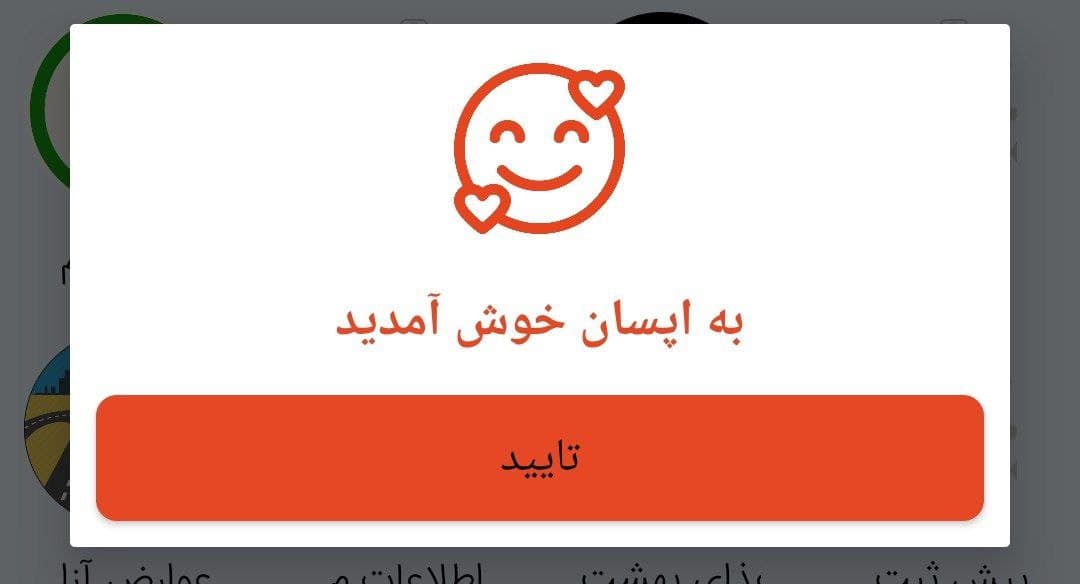
در ادامه یک نمونه از کد dialog را مشاهده کنید:
<dialog borderCornerRadius="3">
    <frame layout="linear_vertical" width="75" height="75" gravity="center">
        <image src="http://162.55.105.137:8080/api/public/dl/IPI8gq4o" width="match_parent" selfgravity="center"></image>
    </frame>
    <frame layout="linear_vertical">
        <text renderas="html" textcolor="#E64724" text="<b>به اپسان خوش آمدید<\b>" textsize="18"
              textalignment="center"></text>
    </frame>
    <button text="تایید" borderCornerRadius="3" background="#E64724" onClick="app/closedialog"></button>
</dialog>
و در نتیجه کد فوق به صورت زیر اجرا میشود :
<page title="">
    <text id="txtP" text="Not updated"/>

    <button text="open dialog" onclick="dialog/d1"/>
    <button text="update text" onclick="script/s1:update()"/>
    <button text="auto close dialog" onclick="dialog/d1;script/s1:autoCloseDialog()"/>

    <script id="s1">
    function update() {
    Appsan.setProperty("txtP", "text", "Updated from page");
    }

        function autoCloseDialog() {
            setTimeout(function() {
                Appsan.runAction("app/closedialog:d1");
        console.log("ran")
            }, 2000);
        }
    </script>
</page>

<bottomsheetdialog id="d1">
<text id="txt" text="Not updated"/>
<button text="Update Me" onclick="script/s2:update()"/>
<button text="Update Parent" onclick="script/s2:updateParent()"/>
<button text="close" onclick="app/closedialog"/>
<button text="close with script" onclick="script/s2:closeDialog()"/>
<script id="s2">
    function update() {
    Appsan.setProperty("txt", "text", "Updated");
    }
    function updateParent() {
    Appsan.setProperty("txtP", "text", "Updated from dialog");
    }
    function closeDialog() {
    Appsan.runAction("app/closedialog");
    }

    function autoCloseDialog() {
    setTimeout(function() {
                    Appsan.runAction("app/closedialog:d1");
    console.log("ran")
    }, 2000);
    }
</script>
</bottomsheetdialog>