# Card

به کمک این المان شما می توانید یک محدوده ی مستطیلی مشخص برای خود ایجاد کرده و المان های دیگر را در آن قرار دهید. مزیت استفاده از card قابلیت مرتب کردن المان ها و دسته بندی آنها در یک کادر است. استفاده از این المان اهمیت بالایی دارد زیرا در جدیدترین نسخه های اندروید از این المان استفاده می شود.

**<span data-darkreader-inline-color="" style="color: #000000;">این المان موارد زیر را داراست:</span>**

##### <span data-darkreader-inline-color="">    ↵  <span style="font-weight: 400;">Onclick</span> :</span>

<span data-darkreader-inline-color="">                <span style="font-weight: 400;">در صورت کلیک شدن المان صدا میشود و مقدار آن یک اکشن می باشد.</span></span>

##### <span data-darkreader-inline-color="">    ↵  <span style="font-weight: 400;">Size</span> :</span>

<span data-darkreader-inline-color="">                <span style="font-weight: 400;">سایز المان را مشخص میکند. </span></span>

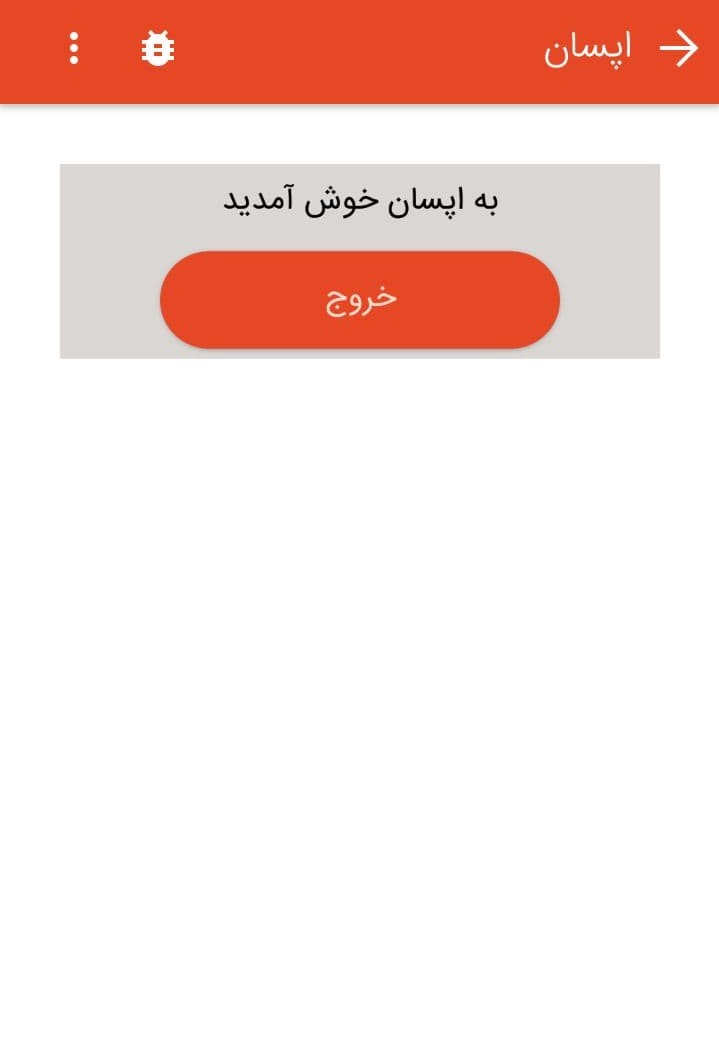
در ادامه نمونه کدی از استفاده <span data-darkreader-inline-color="">Card</span> مشاهده می کنیم :

```XML
<page title="اپسان" background="#DDDDDD" toolbarColor="#E64724" width="match_parent" height="match_parent" >
  <card height="wrap_content" width="wrap_content" margin="50" gravity="center">
       <text textcolor="E64724" textsize="20"  gravity="center_right">به  اپسان خوش آمدید</text>
      <button textcolor="#FFDDCE"  background="#E64724" borderCornerRadius="10"  width="250">خروج</button>
    </card>
</page>
```

و نتیجه ی اجرای کد فوق به شکل زیر است :
![](http://wiki.appsan.ir/uploads/images/gallery/2021-07/photo-2021-07-07-01-06-21.jpg)